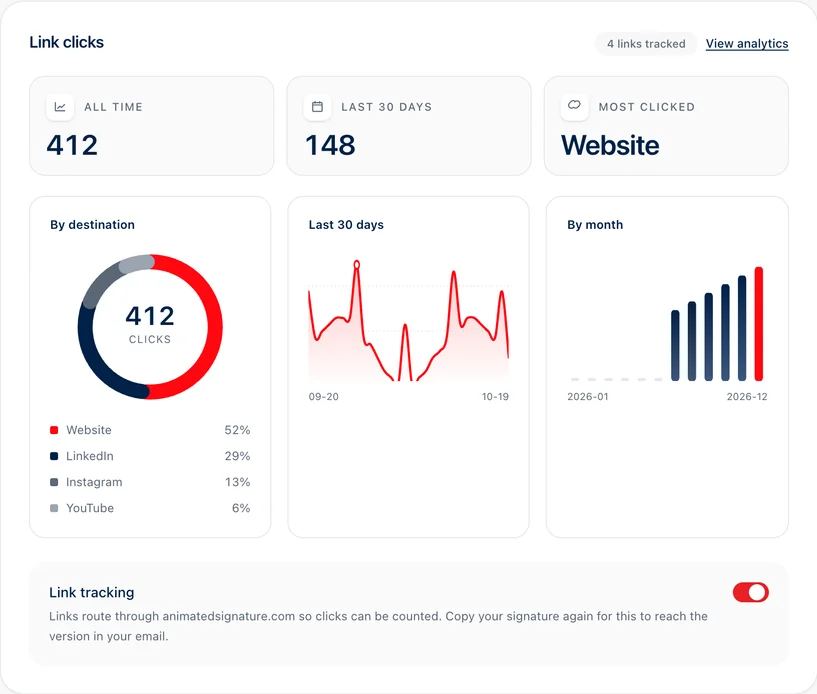
Built-in click counts
With link tracking on, which is how every account starts, each link in your signature is rewritten to pass through a short address on animatedsignature.com. That address counts the click and sends the reader straight on to the page you chose, with nothing in between for them to see.
Switching tracking on rewrites the links in the signature you copy from then on. A signature already pasted into your mail client keeps the links it had until you copy it again, so copy it once after changing the setting.
What is counted, and what is not
- Counted: each click, against the link it was on, by day.
- Counted as a number: the country the click came from, and whether it was on a phone or a computer, by hour.
- Never kept: an address, the browser's details, the email the link was in, or anything about who clicked.
One link clicked over and over inside a minute is counted up to a limit and then sent on uncounted, so nobody can put a number of their choosing on your dashboard by clicking in a loop.
UTM tags for your own analytics
If your website runs Google Analytics or another tool that reads campaign tags, add UTM parameters to the links in your signature. Google's own help names three to use together: utm_source for where the visit came from,utm_medium for the channel and utm_campaign for the campaign. For a signature, that might be:
https://wrenharlow.example/valuations?utm_source=email_signature&utm_medium=email&utm_campaign=spring_valuationsA link keeps its query string all the way through the counter, so the tags reach your analytics with the visitor. Use the same source and medium on every link in the signature and change only the campaign, so the visits add up in one place.
Banners and campaigns
The banner under your signature is a link like the others, and its clicks are counted under Call to action. With campaigns switched on, each campaign also gets banner loads, the number of times its banner was fetched, and a click-through rate. Loads are approximate, because some mail apps fetch pictures before anyone reads the email, so a campaign's clicks are the steadier figure.
Reading the numbers
The dashboard shows your clicks all time and over the last 30 days, and which link gets the most. The Analytics page goes further: totals over the last 7, 30 or 90 days or 12 months against the same span before, clicks over time, the links people use most, a map and a list of the countries clicks came from, phones against computers, the hours people click in your own time zone, and click-through rate by campaign type.
Read it for changes rather than single numbers. A banner that gets more clicks than the one before it, over the same span, is the comparison worth making.
Why not opens
Open tracking needs a hidden picture in every email, and since 2021 Apple Mail can fetch pictures before anyone reads the email, so an open can be a machine. UK and EU regulators also treat tracking pixels as needing consent, which a signature has no moment to ask for. Animated Signature counts clicks and never opens.Click and open tracking, compared, andwhy we never track opens.